
Creating a Collection
-
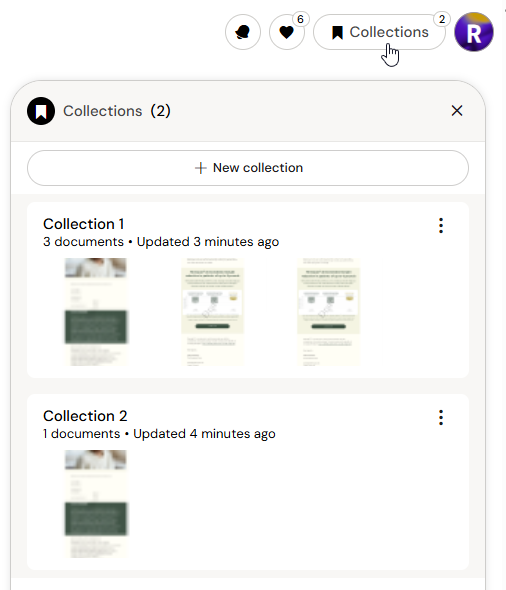
Click the bookmark icon in the top-right toolbar to open the Collections sidebar.
-
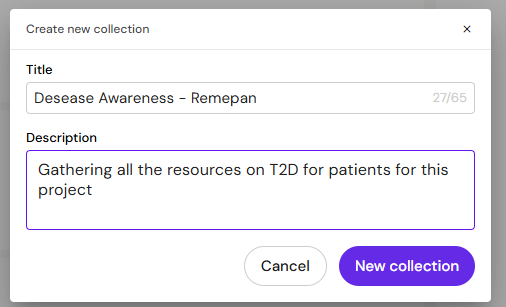
Click New collection.
-
Give the Collection a name (e.g., "Remepan EU Launch 2026") and click Create Collection.
-
Use the search bar to find documents and click + to add them.
-
Click your Collection to open it — Arcane will now search only within those documents.
Deleting a Collection
-
Open the Collections sidebar (bookmark icon, top-right).
-
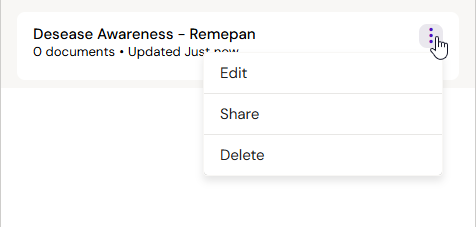
Find the Collection you want to delete.
-
Click the ⋯ menu next to its name.
-
Select Delete and confirm.
Deleting a Collection removes it from your sidebar permanently. The documents inside are not affected — they remain in your Vault library and in any other Collections they belong to.
Shared Collections you have received from a colleague cannot be deleted by you — only the owner can delete them.