
This is a feature that is only enabled when you have licensed both Activator and Arcane.
Publish to Activator lets you send an email tactic authored in Arcane directly to Activator with a single click — no download, no re-upload, no manual hop through file conversions or design-system re-application.
Activator opens with your email and its metadata already loaded, ready for you to refine and publish to Vault using Activator's design system and publishing flow.
Available for email tactics only in v1.12. Other tactic types will continue to show the existing download option. Publishing also requires your organisation to have Activator configured — see For administrators below.
How to publish
-
Finish authoring your email in Arcane.
-
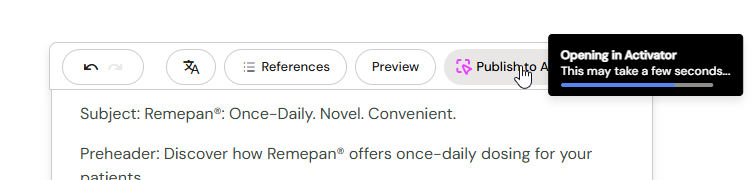
Click Publish to Activator in the top toolbar.
-
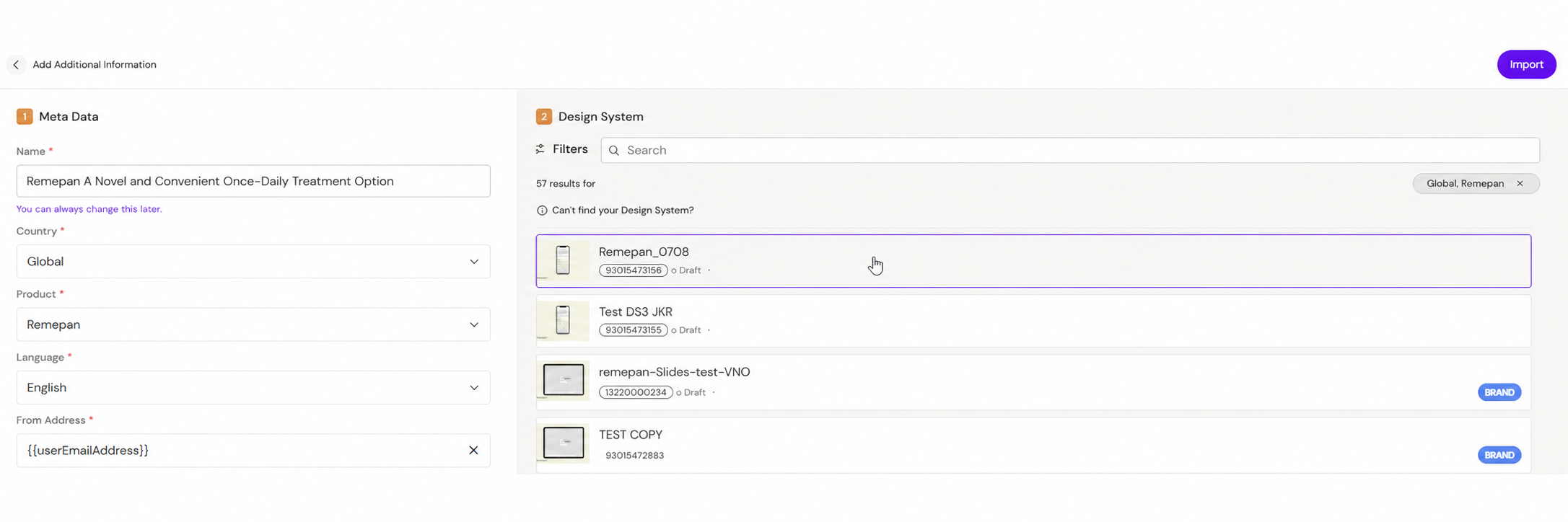
A new tab opens with a pre-flight screen — your tactic's metadata is already filled in and your design system is pre-selected. Review the details and continue.
-
You land in the Activator designer with your email loaded. From here, refine and publish as you would any Activator email.
The first time you publish
Arcane and Activator have separate user accounts until Anthill Cloud unifies them. The first time you publish in a browser session, you'll re-authenticate in Activator using your normal Activator credentials. After that, subsequent publishes in the same session go straight through.
If you don't already have an Activator account, contact your administrator or programme coordinator.
What carries across — and what doesn't
The handoff carries your email content and its metadata into Activator. Once you're in Activator, the email is yours to refine using Activator's design system and tools.
The transfer is one-way. Changes you make in Activator stay in Activator — they don't sync back to Arcane. The pre-flight screen will remind you of this before you continue. If you need to revise the email in Arcane after publishing, work on the Arcane version and publish again.
When you'll see Publish to Activator
The Publish to Activator button appears when all of the following are true:
-
You're working on an email tactic (not slides or other tactic types).
-
Your organisation has Activator configured and connected to Arcane.
If either of these isn't true, you'll see the existing Download option instead.
Related pages
-
Creating a New Email — author an email in Arcane before publishing
-
Downloading Your Email — the alternative outbound path when publishing isn't available